

Option A: Customised Excel Course at your own Offices
Since 2010, we have been providing ‘ Instructor led’ Excel Training Courses onsite at client’s offices nationwide or at our modern training rooms beside the Guinness Storehouse.
Find out about a customized Excel Courses at your offices , Click Here .
Option B: Monthly Public Excel Courses which are open to all.
Next Dates :
Beginners Excel Course: Tuesday 19th August
Intermediate Excel Course: Wednesday 20th August
SPECIAL OFFER this June. Participants, this month, will also get a 5 year licence to our full 6 level Online Excel Course. This comes with its own AI assistant and Excel 365 “content updates”. Also allows you get CPD certified Excel certificates with our repeatable Online exams for main levels.
Option C: Online Excel Courses for individuals and Companies
Our Online Excel Course for individuals and Companies is a 24/7 on demand course that covers all 6 levels of Excel from beginners to advanced , and now includes the “Using Excel with Artificial Intelligence “ course.
Comes with CPD accredited online exams, Virtual AI assistant, live chat support ,and ‘content updated‘ Lifetime access .
Our new “Using Excel with AI” comes with a full course on “ Mastering ChatGPT Prompt Engineering “, a must have skill today that can be used in all your office tasks .
Our Group Corporate edition can handle from 3 to 1,000 users . Its web based , so NO installation required on your side. It track each user’s progress in real time.
Try it out with our 3 day no obligation Corporate Free Trial Click Here or Read More…
Our Clients





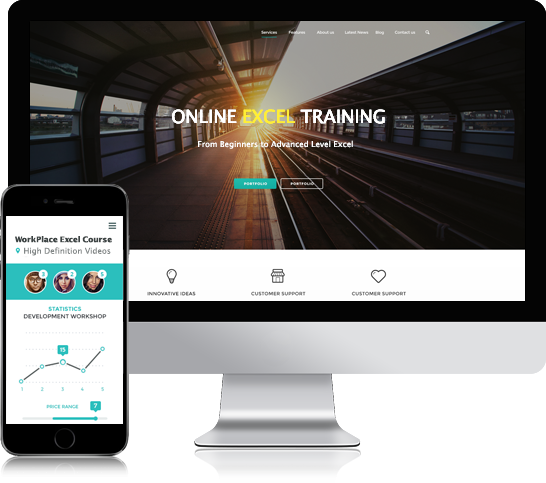
Online Excel Course for Individuals & Companies.
Unlike most online Excel courses, our Online Excel course includes all levels of Excel in one package.
- Beginners Excel
- Intermediate Excel
- Advanced Microsoft Excel
- Pivot tables
- Power Excel with Dax language & Power Pivots.
- “Using Excel with AI” comes with a full course on “ Mastering ChatGPT Prompt Engineering “, a must have new skill today for all your business tasks .
So you can learn Excel from beginners to the most advanced level and you will have lifetime access.
Our course, ‘WorkPlace Excel ” concentrates on the Excel Concepts, Techniques, Functions and Data Analysis Techniques that you will use everyday in real world Irish office environment.
Learn quickly and effectively from over 12 hours of high Definition videos by experienced tutors who mix theory with practical examples of every day tasks.
You can take an assessment at the end of each module to achieve up to 4 levels of certification. With Live chat & Full Email support, its also ideal for groups, as an administrator can track the progress of each employee.
The course covers Excel versions from 2010 to Excel 365
This course is CPD certified for 12 Points.
Cost: €157
Transform your employees’ Excel Skills & Productivity
Just 15 minutes a day for 30 days will transform your team’s Excel Skills and Productivity levels.
Our Certified Online Excel training group Course comes with daily live chat support as they study and also full progress tracking facilities. Covers 6 levels of Excel from Beginners to advanced Power Excel and now Excel with AI.
You can now purchase our 10 licence group account for a one off charge of €997 ( €1570)
or Try it out with our 3 day Free Trial. Click Here
Excel Training Classroom Courses.
These one day intensive instructor led Public courses are run every month and are held in GEC Center, beside the Guinness Storehouse.
We also offer instructor led customized Microsoft Excel training for all skill levels at your offices Nationwide. Please contact us with your requirements.
In our public courses, you can expect and receive…





Beginners Excel Courses
€297 Inclusive
Beginners Excel Course Dates:
- Tuesday 19th August
- Tuesday 16th September
- Tuesday 21st October
Intermediate Excel Courses
€298 Inclusive
Intermediate Excel Course Dates:
- Wednesday 20th August
- Wednesday 17th September
- Wednesday 22nd October
Measure Your Team’s Skill & Efficiency Levels in Excel ?
Our Free self-correcting and timing ‘Testing Workbook’ accurately reveals a person’s ‘actual’ Excel skills level and also their Excel efficiency level within 20 minutes.
The user has to complete 12 ‘real life’ Excel tasks on an actual Excel workbook.
The workbook times and auto-corrects their solutions , producing a personalized report showing their
- Time Efficiency Rating.
- Excel Skill Grade.
- A report which highlights weak areas that might need to be worked on.
Its free to download and it contains NO macros, so it’s totally safe and quick to download and works on all versions of Microsoft Excel from 2007 to Excel 365.
To Learn more and to download your Free copies , Click Here.
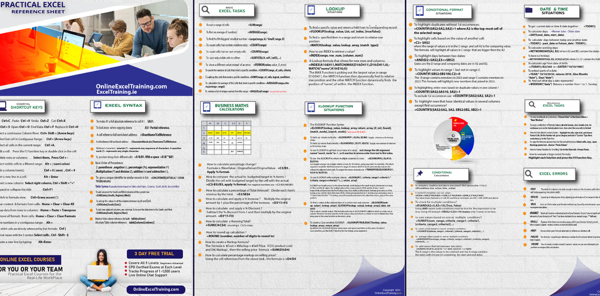
Excel Tasks Condensed into One Page
Download our Free ” high resolution” “fully expandable” image of formula solutions for common Excel Tasks.
Solutions to Problems like:
- Creating a running total.
- Highlight values in range 1 but not in range 2 using Conditional Formatting.
- How to give a unique identifier to similar records in list.
- How to calculate and apply a % Increase.
- How to calculate percentage change.
- How to use the XLOOKUP to return multiple columns or rows:
- and a hundred more
Ideal for saving to your Laptop, Table or Smart Phone for Quick Reference.
To Learn more and get your free copies , Click Here
Train your Staff with our Online Group Excel courses.
One click progress reports available.
Why choose online excel training for your business
Measure Effectiveness
Measure your staffs’ progress via online assessments and employees can replay the videos again and again, if necessary.
Productivity Increase
Each student will will save up to 30 minutes per day by being more efficient in Excel, that’s nearly 12 working days per year.
No Installation headaches.
As a web based training system, there’s no IT integration required and no time spent organizing training, as we set up everything for you.
Save Money
Online training provides a cost effective alternative to traditional classroom based training, with no lost working days or travel expenses.